Our Short List of 3

- Best for: players who share a room and need quiet keypresses without giving up arrows.
- Tenkeyless compact form factor
- 8-zone RGB illumination
- IP32 water and dust resistant
- Whisper quiet gaming switch

- Best for: players who want clicky feedback and a board that travels between desks.
- Mechanical TKL tenkeyless gaming keyboard
- Clicky switches
- Ultra portable frame
- Detachable Micro USB cable
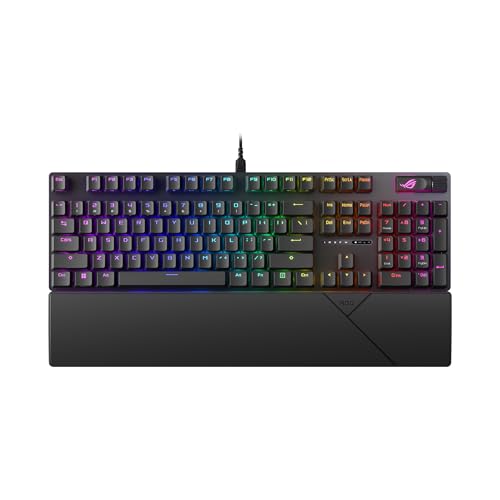
- Best for: players with a full desk who want every key, including the number pad, alongside the arrows.
- 100 Percent full-size layout
- Hot swappable pre-lubed ROG NX Snow V2 linear switches
- PBT keycaps
- RGB backlighting
All 5 Picks at a Glance
| Product | Specs | Action |
|---|---|---|
| 1. SteelSeries Apex 3 TKL |
| Check price on Amazon |
| 2. Logitech G PRO TKL |
| Check price on Amazon |
| 3. ASUS ROG Strix Scope II X |
| Check price on Amazon |
 4. AULA F75 Pro |
| Check price on Amazon |
 5. HyperX Alloy Origins 65 |
| Check price on Amazon |
Key takeaways
- Five gaming keyboards with dedicated arrow-key layouts, from compact 65 percent boards to full-size models, compared on layout, switches, and connection.
Some games still move on the arrow keys, and for players who learned movement that way, the arrow cluster is not a spare part. It is the control that decides whether a board feels right in the first hour. A keyboard that buries its arrows behind a function layer forces an extra keypress into every direction change, which breaks rhythm in platform games, racing games, and any title where arrows steer.
The five boards below all keep a dedicated arrow cluster, and every one states its layout in its listing title, so the arrow keys are part of the product description rather than a guess. The set runs from a compact 65 percent board to a full-size model, with tenkeyless and 75 percent layouts between them, and each pick states its switch style and connection type in the same listing wording.
Quick Picks
As an Amazon Associate we earn from qualifying purchases.
| Product | Best for | Key spec from title |
|---|---|---|
| SteelSeries Apex 3 TKL | Quiet play in shared rooms | Tenkeyless compact form factor |
| Logitech G PRO TKL | Clicky feedback and portability | TKL tenkeyless layout |
| ASUS ROG Strix Scope II X | A full desk setup | 100 Percent full-size layout |
| AULA F75 Pro | Flexible wireless play | 75 Percent hot-swappable layout |
| HyperX Alloy Origins 65 | A small desk | 65 Percent compact form factor |
How to Choose
Match the Layout to the Arrow Cluster You Need
Layout names describe which keys survive. A full-size board keeps everything, including the number pad and a separated arrow cluster. A tenkeyless board drops the number pad and keeps the function row and arrows. A 75 percent board compresses the same keys into a tighter frame, and a 65 percent board keeps arrows in a compact cluster while dropping the function row. A 60 percent board is the one layout that normally gives up dedicated arrows, moving them onto a function layer. Read the layout wording in the listing title first, then check the key count: 87 keys means tenkeyless, and 104 keys means full-size.
Read the Switch Wording Before Anything Else
Switch wording tells you how a keypress feels and sounds. Clicky switches give an audible click on every press, which some players like for feedback and others find loud. Linear switches travel smoothly without a bump or click, which suits players who want quiet, fast presses. Tactile switches add a small bump without the click. The listing titles in this set state the switch style openly, so match the wording to the room you play in and the noise level you accept. Hot-swappable wording matters too: it means the switches can be changed without soldering, which keeps a board useful when tastes change.
Weigh Wired, Wireless, and Tri-Mode Connection
Connection wording decides where a board can sit. A wired USB board needs no charging and no dongle, and it suits a fixed desk. A wireless board frees the desk but needs charging or batteries, so check whether the listing states Bluetooth, 2.4GHz, or both. Tri-mode wording means all three: Bluetooth, 2.4GHz, and USB-C wired, which covers a laptop, a desktop, and a console-side setup from one board. A board that states only Bluetooth will not suit a setup that needs a dongle connection, so read the connection list literally and match it to the ports on your machine.
Check Keycaps, Backlighting, and Software
Keycap wording affects how long legends stay readable. Double-shot PBT keycaps state two layers of plastic, so the legends cannot wear off the way printed legends can. Side-printed keycaps move the legends to the side of each key, which suits players who want a clean top surface. Backlighting wording ranges from single-colour backlighting to per-key RGB with zones, and the listing title usually states the zone count or the lighting style. Software wording names the companion app, and it is worth checking on the listing whether that app covers the settings you actually want, such as lighting, macros, or polling.
The 5 Best Options
1. SteelSeries Apex 3 TKL
- Best for: players who share a room and need quiet keypresses without giving up arrows.
- Tenkeyless compact form factor
- 8-zone RGB illumination
- IP32 water and dust resistant
- Whisper quiet gaming switch
players who share a room and need quiet keypresses without giving up arrows.
the listing title states no wireless wording, so this is a wired desk board, and it states no hot-swappable wording either.
The Apex 3 TKL is the quiet board in this set, built around whisper-quiet switches in a tenkeyless frame that keeps the arrow cluster and function row while dropping the number pad. Its listing title leads with the tenkeyless compact form factor and 8-zone RGB illumination, and it states IP32 water and dust resistance, which is rare wording in this group and suits a desk where drinks sit close to the keyboard. Gaming-grade anti-ghosting wording covers simultaneous keypresses, so diagonal movement with arrows plus action keys registers as intended.
Watch out for: the listing title states no wireless wording, so this is a wired desk board, and it states no hot-swappable wording either.
2. Logitech G PRO TKL
- Best for: players who want clicky feedback and a board that travels between desks.
- Mechanical TKL tenkeyless gaming keyboard
- Clicky switches
- Ultra portable frame
- Detachable Micro USB cable
players who want clicky feedback and a board that travels between desks.
clicky switches make an audible click on every press, which carries in quiet rooms, and the listing title states no wireless wording.
The G PRO is the portable pick, a mechanical tenkeyless board whose listing title states clicky switches, an ultra-portable frame, and a detachable Micro USB cable. The click gives clear audible feedback on every press, which suits players who rely on hearing each input land, and the detachable cable means the board packs flat for travel between setups. Lightsync backlighting wording covers 16.8 million colours, so lighting can be set per key or per zone through the companion software rather than left at a single fixed colour.
Watch out for: clicky switches make an audible click on every press, which carries in quiet rooms, and the listing title states no wireless wording.
3. ASUS ROG Strix Scope II X
- Best for: players with a full desk who want every key, including the number pad, alongside the arrows.
- 100 Percent full-size layout
- Hot swappable pre-lubed ROG NX Snow V2 linear switches
- PBT keycaps
- RGB backlighting
players with a full desk who want every key, including the number pad, alongside the arrows.
the listing title states wired USB only, with no wireless wording, so the board stays at one desk.
The Strix Scope II X is the full-size pick, a wired USB board whose listing title states a 100 Percent full-size layout with the number pad, the function row, and a separated arrow cluster all present. Its switches are hot-swappable pre-lubed ROG NX Snow V2 linear switches, so the feel is smooth and the switches can be changed without soldering if preferences shift later. PBT keycaps and RGB wording round out a listing that states PC and Mac support, which makes this the board for a fixed desk where nothing is dropped for compactness.
Watch out for: the listing title states wired USB only, with no wireless wording, so the board stays at one desk.
4. AULA F75 Pro
- Best for: players who move one board between a desktop, a laptop, and a wireless setup.
- 75 Percent hot-swappable custom keyboard
- Control knob
- RGB backlit, pre-lubed Reaper switches
- Side printed PBT keycaps
players who move one board between a desktop, a laptop, and a wireless setup.
the compressed 75 percent frame puts keys closer together than a tenkeyless board, so large hands should check the layout before buying.
The F75 Pro is the flexible pick, a 75 percent board whose listing title states hot-swappable construction, a control knob, RGB backlighting, and tri-mode connection across 2.4GHz, USB-C, and Bluetooth 5.0. The 75 percent layout keeps arrows and the function row in a compressed frame, so it suits a desk where mouse room matters but dedicated arrows are still required. Pre-lubed Reaper switches and side-printed PBT keycaps are both stated in the listing wording, which covers feel and legend durability in one title.
Watch out for: the compressed 75 percent frame puts keys closer together than a tenkeyless board, so large hands should check the layout before buying.
5. HyperX Alloy Origins 65
- Best for: players on a small desk who still want dedicated arrow keys under the right hand.
- Compact 65 Percent form factor
- Linear red switch
- Double shot PBT keycaps
- RGB LED backlit
players on a small desk who still want dedicated arrow keys under the right hand.
the function row is gone in the 65 percent layout, so function keys live on a layer, and the listing title states no wireless wording.
The Alloy Origins 65 is the compact pick, a 65 percent board whose listing title states a compact 65 percent form factor with linear red switches, double-shot PBT keycaps, and RGB LED backlighting. The 65 percent layout keeps a dedicated arrow cluster while dropping the function row and number pad, which frees the most desk space in this set without moving arrows onto a function layer. NGENUITY software wording covers lighting and macro settings, and the listing states a compact frame that suits small desks and keyboard trays.
Watch out for: the function row is gone in the 65 percent layout, so function keys live on a layer, and the listing title states no wireless wording.
Which One Fits Your Situation
A Small Desk Where Mouse Room Matters
Pick the 65 percent or 75 percent board when the desk is tight. The HyperX 65 percent board frees the most space while keeping arrows under the right hand, and the AULA 75 percent board adds the function row back in a still-compact frame. Both keep dedicated arrows, so movement never needs a function key held down. Measure the desk first: a compact board only helps if the mouse actually gains room.
A Shared Room Where Noise Travels
Pick the quiet switches when other people are nearby. The SteelSeries whisper-quiet switches and the HyperX linear red switches both avoid the audible click that clicky switches make on every press. Linear switches travel smoothly and quietly, which suits late sessions and shared rooms. Avoid the clicky Logitech board for this situation unless the room is yours alone, because the click carries further than most players expect.
A First Board You Can Change Later
Pick a hot-swappable board when tastes are still forming. The ASUS full-size board and the AULA 75 percent board both state hot-swappable switches, so the feel can change later without buying a new board or soldering anything. Start with the switches each board ships with, learn which feel suits your games, and swap only if a different style appeals. A board without hot-swap wording locks in its switches, so treat that as a long-term commitment.
A Full Desk Setup That Keeps the Number Pad
Pick the full-size board when the desk has room and the number pad earns its place. The ASUS 100 Percent board keeps the pad, the function row, and a separated arrow cluster, which suits players who also type numbers or bind pad keys in games. The trade is desk space: the board is the widest in this set, so the mouse sits further right. If the desk is deep enough for that reach, nothing else here matches its completeness.
Common Mistakes
- Buying a 60 percent board and expecting dedicated arrow keys: 60 percent layouts move arrows onto a function layer, so check the layout wording before buying.
- Assuming every compact board is wireless: several boards in this set state wired USB only, so read the connection wording literally.
- Choosing clicky switches for a shared room: the click is audible on every press, so match switch wording to the room, not just the game.
- Ignoring keycap wording: printed legends wear, while double-shot PBT wording states legends that cannot rub off.
- Expecting software features the listing never states: check the named companion app and its settings wording on the listing itself.
Frequently Asked Questions
Do 65 percent keyboards have arrow keys?
Yes. A 65 percent layout keeps a dedicated arrow cluster while dropping the function row and the number pad. The arrow keys sit in a compact cluster at the lower right, so movement works without holding a function key. Check the listing title for 65 percent wording and a key count near 68 keys, which confirms the cluster is present rather than layered.
Is tenkeyless the same as 75 percent?
No. Tenkeyless drops only the number pad, keeping the function row and a separated arrow cluster at 87 keys, while 75 percent compresses the same keys into a tighter frame with less space between groups. Both keep dedicated arrows, but tenkeyless feels closer to a full-size board and 75 percent saves more desk space. The listing title states which layout a board uses, so the distinction is visible before buying.
Are clicky switches better for gaming?
Clicky switches suit players who want audible feedback on every press, because the click confirms each input. They are not faster or more accurate than linear or tactile switches, and the noise carries in shared rooms. Linear switches suit players who want smooth, quiet presses, while tactile switches add a bump without the click. Choose the feel that matches the room and the games.
Can a wireless keyboard keep up in games?
A wireless board with 2.4GHz wording states a dedicated dongle connection, the wireless mode most players choose for games, while Bluetooth wording suits general use and travel. Tri-mode boards state all three connections, so one board can run wired at the desk and wireless elsewhere. Check what the listing states about charging and whether the board can run wired while it charges.