Our Short List of 3
All 3 Picks at a Glance
| Product | Specs | Action |
|---|---|---|
 1. Google Nest Thermostat | Check price on Amazon | |
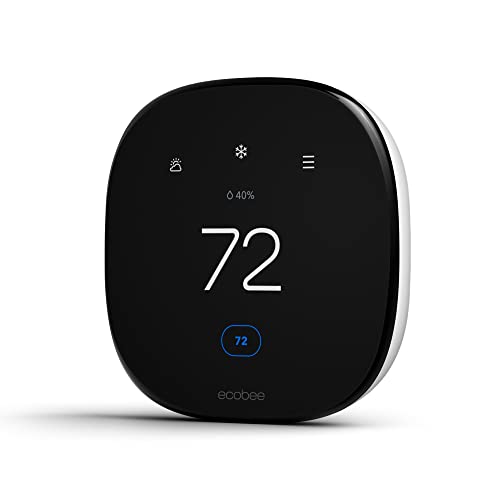 2. ecobee Smart Thermostat Enhanced | Check price on Amazon | |
 3. Sensi Smart Thermostat | Check price on Amazon |
Key takeaways
- Compare the best thermostats to save money through scheduling, learning, geofencing and room sensing, with compatibility and C-wire guidance for your home.
As an Amazon Associate we earn from qualifying purchases.
Affiliate Disclosure: This article contains affiliate links. If you buy through a link on this page, we may earn a commission at no extra cost to you.
A thermostat saves money in one unglamorous way: it stops your heating and cooling system running at full comfort settings when nobody needs full comfort. That means a lower heating setpoint or a higher cooling setpoint while you are asleep or out of the house, and a return to your normal temperature in time for the home to feel right when you wake or arrive. Every model in this guide earns its place by automating that setback reliably, because a schedule you have to remember to set by hand every day is a schedule that quietly stops happening. This article explains the mechanisms that reduce wasted energy, compares four thermostats that use them in different ways, and helps you check compatibility before you buy, since the wrong thermostat for your wiring or system type saves nothing at all.
We did not test these thermostats ourselves. Features and specifications below come from manufacturer product information and published listing information for each model. Savings are described qualitatively, in line with how the manufacturers describe their own energy-saving features, because your actual result depends on your climate, your system, your home’s insulation, and how large a setback your household will accept. No thermostat can save energy in a home that is kept at one temperature around the clock by choice.
Quick picks
- Best for set-and-forget learning: Google Nest Thermostat — a smart, programmable Wi-Fi thermostat, ENERGY STAR certified, designed to help you save energy and stay comfortable.
- Best for precise schedules and Apple households: ecobee Smart Thermostat Enhanced — a Wi-Fi thermostat with detailed scheduling, smart-home integration including Apple Home, and an included power extender option for homes without a common wire.
- Best simple smart control: Sensi Smart Thermostat — a long-established Wi-Fi model from Copeland’s Sensi line, with scheduling, remote app control, and a straightforward interface.
- Best colour touchscreen control: Honeywell Home RTH9600WF Smart Color Thermostat — an ENERGY STAR rated Wi-Fi model with a customisable colour touchscreen and programmable scheduling.
How a thermostat actually reduces energy use
Setback schedules
The core saving is the setback. When a house spends the working day and the night at a more economical temperature, the heating or cooling system runs for fewer hours in total. A programmable thermostat automates at least two setpoints a day, and the models here support far more detailed weekly patterns, including different schedules for weekdays and weekends. The saving mechanism is runtime reduction, nothing more mysterious than that, and it works with almost any forced-air, heat pump, or boiler system that accepts a standard thermostat.
Learning and adaptation
A learning thermostat builds the schedule for you from the adjustments you make in the first days of use, then refines it. That matters because the most common reason programmable thermostats fail to save energy is that owners never program them, or program them once and then override them permanently. A thermostat that observes your routine and proposes or applies a sensible schedule removes that friction. Learning features work best in homes with a regular routine; in a home with irregular shift patterns, a manually built schedule or occupancy-based control may serve you better.
Occupancy, geofencing, and room sensing
Occupancy detection and phone-based geofencing add a second layer: the house can drop into an away state when nobody is home, even outside the planned schedule, and return to comfort settings as someone approaches. Remote room sensors, available for some of the brands in this guide as included or optional accessories, address a different waste: heating or cooling the whole house to satisfy one badly placed hallway thermostat while the bedroom or living room sits at the wrong temperature. None of these features creates energy from nothing. Each one reduces the hours your system spends conditioning an empty house or overshooting the rooms you actually use.
What savings claims really mean
Manufacturers describe savings relative to a baseline, often a home held at a single constant temperature all day. If your old thermostat was already programmed carefully, your additional saving from a smarter model will be smaller than a headline claim suggests, and most of your benefit will come from convenience, alerts, and better control of exceptions like holidays and early returns. If your old thermostat was manual and the house ran at one temperature around the clock, the potential improvement is much larger. Judge any model by whether its features match the waste in your own home, not by a headline figure.
The picks in detail
1. Google Nest Thermostat
The Google Nest Thermostat is the mainstream smart model in Google’s line: a programmable Wi-Fi thermostat, described in its listing information as an ENERGY STAR certified smart thermostat for the home that helps you save energy and stay comfortable. Control runs through the Google Home app, schedules can be built and adjusted from your phone, and the thermostat can use presence-based routines through the wider Google Home ecosystem to ease temperatures back when the house is empty.
This is the natural pick for a household already using Google Home speakers, displays, or routines, and for anyone who wants the schedule managed from one familiar app. It is also a sensible first smart thermostat because the interface is deliberately simple: a mirrored display, a turn-and-tap style interaction on the device itself, and the detailed work done in the app.
Check wiring before you order. The Nest Thermostat is designed for most 24 volt heating and cooling systems, but some systems, including certain configurations without a common wire, need an additional power connector or professional help. Google provides a compatibility checker, and using it with a photograph of your current wiring is the single most valuable step in the whole purchase. If your household is built around Apple Home or you want remote room sensors in the box, look at the ecobee below instead.
2. ecobee Smart Thermostat Enhanced
The ecobee Smart Thermostat Enhanced is built around precise, user-controlled scheduling. Where the Nest leans toward automation, ecobee gives you a detailed schedule you define, with changes allowed at fine intervals, plus smart features that pause heating or cooling when a window or door has been left open in compatible setups, and alerts for unusual temperature or system behaviour. Published comparisons describe the Enhanced as delivering the core ecobee experience, integrating with Apple Home, Alexa, and SmartThings, and supporting heat pump systems with auxiliary heat in multi-stage configurations.
A practical advantage for older homes is the power extender approach ecobee uses for houses without a common wire, which is included with several ecobee models and avoids running new cable through finished walls. Confirm the exact contents of the listing you buy, because adapter inclusion varies by model and bundle.
Choose the Enhanced if your routine is regular enough to schedule precisely, if you want your thermostat visible inside Apple Home as well as its own app, or if you plan to add remote room sensors later to even out hot and cold rooms. Its touchscreen is larger and more information-dense than the Nest’s minimal display, which some owners prefer and others find busier than they need.
3. Sensi Smart Thermostat
The Sensi Smart Thermostat, from the Sensi line now made by Copeland, is the understated option in this guide. It offers Wi-Fi control through the Sensi app, flexible scheduling, and a physical interface that still looks and behaves like a conventional thermostat, which makes it a good fit for households where not everyone wants to manage heating from a phone. Sensi has also built its reputation on a privacy-conscious approach, stating that it does not sell personal data, a point that matters to some buyers more than any feature list.
For saving energy, the Sensi does the essentials properly: repeatable schedules, remote adjustment so a forgotten away day does not mean a full day of conditioning an empty house, and usage awareness through the app so you can see when your system is running. It lacks the learning behaviour and the deep smart-home ecosystem features of the Google and ecobee models, and that is precisely its appeal for a simpler home.
Compatibility is broad across conventional and heat pump systems, but as with every model here, verify your wire count and system type against the manufacturer’s compatibility tool first, and note that a common wire is required or recommended for reliable Wi-Fi operation on many Sensi installations.
4. Honeywell Home RTH9600WF Smart Color Thermostat
ASIN: B09TBGGLQB — candidate. This code was identified from published listing information naming the Honeywell Home RTH9600WF Smart Color Thermostat; the live Amazon US product page could not be read at the time of writing, so the code is recorded as a candidate, not verified.
The Honeywell Home RTH9600WF, also sold as the Smart Color Thermostat, puts its control on the wall: a colour touchscreen whose background and display can be customised, with the full schedule programmable directly on the device as well as through Wi-Fi. Listing information describes it as an ENERGY STAR rated model. For households that think of the thermostat as a wall control first and an app second, that on-device completeness is the reason to choose it.
Honeywell Home, made by Resideo, supports a wide range of conventional and heat pump systems, and the brand’s dealer network is extensive, which helps if you would rather have the thermostat supplied and fitted during a service visit. The Smart Color’s saving mechanism is the same disciplined scheduling as the other picks, presented through an interface some owners find easier to teach to the whole household.
Consider the trade-offs honestly. A feature-rich touchscreen model rewards a household that will actually build and maintain a schedule; if nobody in the home will program it and nobody will use the app, a learning model will save more energy in practice. Confirm common wire requirements for this model against your wiring before buying, as Wi-Fi colour touchscreen thermostats draw more power than a simple battery programmable unit.
Compatibility checks that decide whether you save anything
Find your system type. Conventional furnace and air conditioner, heat pump with auxiliary heat, boiler with radiators, and millivolt or line-voltage systems are wired differently. All four picks here are low-voltage thermostats for conventional and heat pump systems. Line-voltage electric baseboard heating needs a different class of thermostat entirely, and none of these models is a substitute.
Count your wires. Photograph the terminals behind your current thermostat before disconnecting anything. A common wire, labelled C, powers most Wi-Fi thermostats reliably. Without one, some models include or offer a power extender or connector, some can work in limited configurations, and some will simply misbehave with Wi-Fi dropouts. Solve this on paper before the box arrives.
Check stages and accessories. Multi-stage heating and cooling, dual-fuel heat pumps, whole-home humidifiers and dehumidifiers, and ventilators each need terminal support on the thermostat. Match the manufacturer’s stated stage support to your system, not to the system you hope to install later.
Consider your platform. A thermostat is a ten-year wall fixture and a daily app. Choose the model whose app and voice assistant match the phones and speakers your household already uses, because a thermostat exiled from your routine is a thermostat whose schedule slowly rots.
Habits that matter more than the model
Set a setback you can live with and keep it. A modest setback held for long hours beats an aggressive setback that everyone overrides within the hour. Use the hold function sparingly, because a permanent hold silently cancels the schedule that does the saving. Review the schedule when the seasons change and when household routines change, such as a new job, a baby, or a shift to working from home. Keep filters clean and vents unblocked, since a thermostat cannot compensate for a system struggling against a clogged filter. And use away modes for holidays rather than switching the system off entirely in cold weather, where freeze protection for pipes matters more than a few days of heating.
Renters and owners of older wiring should also check for utility and manufacturer programmes in their area that support smart thermostat adoption, and read the terms before relying on any of them. Availability and conditions vary widely by location and change over time.
Frequently asked questions
Do smart thermostats really save money?
They save energy when they reduce the hours your system spends at full comfort settings in an empty or sleeping house, and lower energy use is what lowers running costs over time. The effect is largest in homes switching from a manual thermostat held at one temperature, and smallest in homes whose programmable thermostat was already scheduled carefully.
Is a learning thermostat better than a programmable one?
For households that never program a schedule, learning is better in practice because a schedule actually gets built. For households with a fixed routine who like control, a detailed programmable schedule on a model like the ecobee can match it. The best thermostat is the one whose schedule is still running in six months.
Do I need a common wire?
Many Wi-Fi thermostats need one for reliable power, or need the manufacturer’s power extender or connector fitted instead. Check your wiring and the model-specific requirements before buying, and budget for professional installation if the wiring is unclear.
Will these thermostats work with a heat pump?
The brands in this guide all publish heat pump support for relevant models, including auxiliary heat configurations, but stage counts and dual-fuel handling differ. Verify your exact system against the manufacturer’s compatibility checker.
What if I have electric baseboard heating?
You need a line-voltage thermostat designed for electric heat. The low-voltage smart thermostats in this guide are not suitable for that system.
Bottom line
For most households, the Google Nest Thermostat at ASIN B08HRWWCTR (candidate) is the easiest route to consistent setbacks, the ecobee Smart Thermostat Enhanced at ASIN B09XXTQPXC (candidate) is the best choice for precise schedules and Apple Home households, the Sensi Smart Thermostat at ASIN B01NB1OB0I (candidate) keeps things simple and privacy-conscious, and the Honeywell Home RTH9600WF at ASIN B09TBGGLQB (candidate) suits anyone who wants full control on a colour touchscreen at the wall. All four save energy the same fundamental way, by not conditioning an empty house at comfort settings. Check your system type, your wires, and your platform first, then pick the interface your household will still be using next winter.