Our Short List of 3

- Best for: PC drivers with a fixed rig who want the most adjustable lever in this group.
- 16-bit non-contact high precision angle sensor
- Aviation-grade aluminum body, CNC machined, anodized finish
- Horizontal or vertical lever mounting with adjustable angles
- Swappable yellow and blue springs, black elastomer, damper and spacers included
- Best for: A first PC rig on a desk, where the included clamp and plug-and-play setup matter most.
- 64-bit non-contact Hall sensor with automatic calibration
- 2-meter nylon USB cable; plug and play on Windows, no driver install
- Desk clamp included in the box
- Handle height and angle adjustable; reinforced spring for lever return

- Best for: Xbox drivers with a Logitech G920 who want a handbrake that works on console.
- 14-bit non-contact Hall sensor for progressive input
- All-steel structure apart from the electronics
- USB 3.0 connection; steering wheel connects through the handbrake
- Listed for Logitech G920 on Xbox One and Xbox Series X and S
All 5 Picks at a Glance
| Product | Specs | Action |
|---|---|---|
| MOZA HBP Handbrake |
| Check price on Amazon |
| aikeec 64Bit PC USB Handbrake |
| Check price on Amazon |
| MAD HORNETS 14Bit USB Handbrake |
| Check price on Amazon |
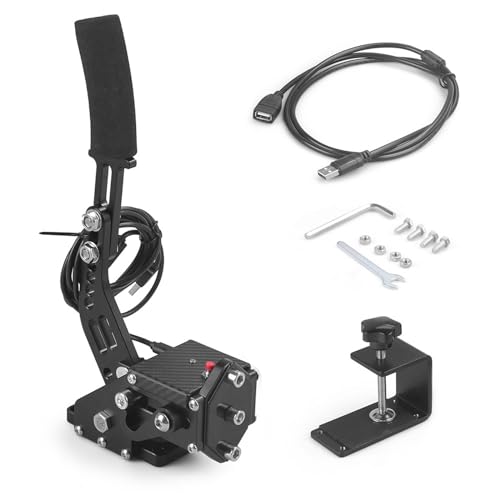 64Bit USB Handbrake for PC, PS4 and PS5 |
| Check price on Amazon |
 CNRAQR 16Bit PC USB Handbrake |
| Check price on Amazon |
Key takeaways
- The best sim racing handbrake for rally and drift depends on your platform and rig. Compare 5 USB handbrakes for PC, Xbox and PlayStation before you buy.
A button-mapped handbrake gives you one choice: locked or released. On a rally stage that binary input costs time, because a hairpin asks for a short tug to rotate the car and a full pull to hold a slide, and the two moves feel nothing alike. An analog USB handbrake reads how far you pull the lever, so the same control covers a gentle nudge and a committed yank, which is exactly what rally and drift titles expect from the hardware.
This guide is for PC rally and drift drivers, Xbox owners with a Logitech G920, and PlayStation owners with a Logitech G29, plus anyone building a first rig on a desk. Every pick below was chosen from the names and specifications on its Amazon product page, with platform and mounting checked against the listing so the lever you order fits the wheel and cockpit you already own.
Quick Picks
As an Amazon Associate we earn from qualifying purchases
| Product | Best for | Key spec from title |
|---|---|---|
| MOZA HBP Handbrake | A fixed rig you plan to keep | 16-bit angle sensor, CNC aluminum body |
| aikeec 64Bit PC USB Handbrake | A first desk setup | 64-bit Hall sensor, desk clamp included |
| MAD HORNETS 14Bit USB Handbrake | Xbox with a Logitech G920 | 14-bit Hall sensor, USB 3.0 chain |
| 64Bit USB Handbrake for PC, PS4 and PS5 | PlayStation with a Logitech G29 | 64-bit Hall sensor, on-off switch |
| CNRAQR 16Bit PC USB Handbrake | A rig that needs a mounting plate | 16-bit Hall sensor, clip and plate included |
How to Choose
Sensor type and resolution
Nearly every USB handbrake in this range reads lever position with a non-contact magnetic sensor, listed either as a Hall sensor or as an angle sensor. Non-contact matters because there is no wiper dragging across a track, so there is no contact surface to wear out after thousands of pulls. Listings quote figures such as 14-bit, 16-bit or 64-bit; treat those numbers as the maker’s description of the hardware, not a promise of feel. A separate design, the load cell, reads force instead of travel, and none of the five models below is listed as a load cell unit.
Platform and wheel compatibility
On PC, a USB handbrake appears as its own game controller and works alongside almost any wheel, so platform is rarely the deciding factor there. Consoles are stricter. The Xbox model below is listed for the Logitech G920 on Xbox One and Xbox Series X and S, and the PlayStation model is listed for the Logitech G29 on PS4 and PS5, with the handbrake chaining through the wheel in both cases. Always match the handbrake to the exact wheel and console named in its listing, because that single detail is where handbrake purchases most often go wrong.
Mounting hardware in the box
A handbrake takes hard, repeated pulls, so how it attaches matters as much as the sensor inside. The options below include a desk clamp, a fixing clip with a separate mounting plate, and a bolt pattern meant for aluminum profile cockpits. Check what is in the box before assuming a clamp is included, because some listings sell the mounting hardware separately. A lever that wanders across the desk mid-stage is worse than a cheap sensor, so count the mounting hardware as part of the product, not as an accessory you will sort out later.
Adjustment and build quality
Swappable springs and elastomers change how hard the lever is to pull, stop positions change how far it travels, and some levers can be repositioned between horizontal and vertical layouts. Bodies range from mild steel and CNC machined aluminum to all-steel frames, which affects weight and how the unit feels when it is bolted down. The MOZA HBP is the only pick here with a CNC machined aluminum body, swappable springs and an elastomer, and a choice of USB or wheel base connection, while the budget picks trade adjustment for a lower entry point and a simpler setup.
The 5 Best Options
MOZA HBP Handbrake
- Best for: PC drivers with a fixed rig who want the most adjustable lever in this group.
- 16-bit non-contact high precision angle sensor
- Aviation-grade aluminum body, CNC machined, anodized finish
- Horizontal or vertical lever mounting with adjustable angles
- Swappable yellow and blue springs, black elastomer, damper and spacers included
PC drivers with a fixed rig who want the most adjustable lever in this group.
The listing is for PC only, with no console support, so Xbox and PlayStation drivers need a different pick.
The MOZA HBP is the strongest build in this group, and it suits a driver with a fixed rig who wants the lever to feel like a mechanism rather than a bent pin. Its body is CNC machined from aviation-grade aluminum with an anodized finish, and a non-contact 16-bit angle sensor reads lever position without a wearing part. The lever mounts horizontally or vertically with an adjustable angle, the lever length has two positions, and the travel stop moves between two settings, so the pull can be shaped to the seat and the cockpit around it.
aikeec 64Bit PC USB Handbrake
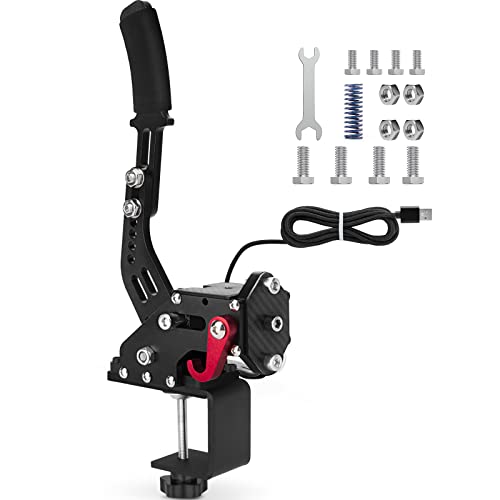
- Best for: A first PC rig on a desk, where the included clamp and plug-and-play setup matter most.
- 64-bit non-contact Hall sensor with automatic calibration
- 2-meter nylon USB cable; plug and play on Windows, no driver install
- Desk clamp included in the box
- Handle height and angle adjustable; reinforced spring for lever return
A first PC rig on a desk, where the included clamp and plug-and-play setup matter most.
It is a PC-only device, so console drivers should look at the MAD HORNETS or the 64Bit PlayStation model instead.
The aikeec is one of the most common sights in entry-level PC rigs, and it earns its place by making the first setup short. It is built around a 64-bit non-contact Hall sensor with automatic calibration, and it connects with a 2-meter nylon USB cable, so there is no driver install between the box and the game. Four buttons on the unit can be mapped in game alongside the analog axis, and the handle height and angle adjust to sit beside the wheel, which matters when the lever shares a desk with a shifter.
MAD HORNETS 14Bit USB Handbrake
- Best for: Xbox drivers with a Logitech G920 who want a handbrake that works on console.
- 14-bit non-contact Hall sensor for progressive input
- All-steel structure apart from the electronics
- USB 3.0 connection; steering wheel connects through the handbrake
- Listed for Logitech G920 on Xbox One and Xbox Series X and S
Xbox drivers with a Logitech G920 who want a handbrake that works on console.
The listing names the G920 and Xbox consoles only, and it is not listed for PC or PlayStation use, so confirm the wheel before ordering.
Most USB handbrakes stop at the PC, but the MAD HORNETS unit is built for the console side of the room. It is listed for the Logitech G920 on Xbox One and Xbox Series X and S, and it wires into the setup in a chain: the handbrake connects to the console over USB 3.0, and the steering wheel passes through the handbrake. That narrow fitment is the whole point of this pick, because a generic PC lever simply does not register on an Xbox, and this one is made for exactly one wheel and one console family.
64Bit USB Handbrake for PC, PS4 and PS5
- Best for: PlayStation drivers with a Logitech G29, or PC drivers who want the clip-mount layout.
- 64-bit Hall sensor with automatic calibration
- Aluminum body
- 1.8-meter USB cable with an on-off switch on the unit
- Fixing clip and reinforced spring included in the box
PlayStation drivers with a Logitech G29, or PC drivers who want the clip-mount layout.
Console support is tied to the G29 alone, so a different wheel on PlayStation is not covered by the listing.
PlayStation players get their own version of the generic 64-bit design with this model. The listing states PS4 and PS5 support when used with the Logitech G29, while on PC it connects over USB as a standalone device that works with all steering wheels. The 64-bit Hall sensor uses automatic calibration, and there is a switch on the unit that turns the handbrake on or off without unplugging the cable, which is a small touch that saves a fumble when switching between games that do and do not need a handbrake.
CNRAQR 16Bit PC USB Handbrake
- Best for: PC drivers who want a mounting plate in the box instead of buying hardware separately.
- 16-bit non-contact Hall sensor
- CNC machined aluminum and mild steel construction
- 2-meter USB cable
- Detachable handbrake, fixing clip, mounting plate, 2 mini wrenches and USB cable included
PC drivers who want a mounting plate in the box instead of buying hardware separately.
The listing is explicit that this blue variant does not apply to Xbox or PlayStation consoles, so it is a PC-only pick.
The CNRAQR takes the standard steel PC handbrake layout and bundles the mounting hardware that many rivals sell separately. Alongside the detachable handbrake itself, the box includes a fixing clip, a mounting plate, two mini wrenches and a 2-meter USB cable, so the lever can be bolted to a plate on a rig or clipped in place out of the box. The sensor is a 16-bit non-contact Hall unit, and the construction is listed as CNC machined aluminum and mild steel, which puts it a step above the lightest budget levers in build.
Which One Fits Your Situation
You race on PC with a fixed rig
Pick the MOZA HBP. Its CNC aluminum body, swappable springs and elastomer, adjustable lever angle and two connection routes suit a rig you plan to keep, and the Pit House software lets you shape the output curve to the car. The trade-off is platform reach, since it is PC only, but on a dedicated PC rig that limit never shows up.
You are building a first rig on a desk
Pick the aikeec. The desk clamp in the box, the adjustable handle height and angle, and the plug-and-play setup with no driver install make it the shortest path from the box to a working lever. The four extra buttons are a bonus for mapping a second function, and the automatic calibration keeps the pull reading the same every session.
You race on Xbox with a Logitech G920
Pick the MAD HORNETS. It is the only pick here listed for Xbox, and its USB 3.0 chain puts the wheel through the handbrake so the console sees the input. Check that the wheel is a G920 before ordering, because the listing names that wheel alone, and a different wheel is not covered.
You race on PlayStation with a Logitech G29, or you want the cheapest plate-mounted lever
Pick the 64Bit model for PS4 and PS5 if you drive on PlayStation with a G29, since it is the only pick here listed for that console and wheel. If you drive on PC and want a mounting plate in the box, pick the CNRAQR instead, which bundles the clip, the plate and the wrenches for a bolted-down install.
Common Mistakes
- Buying a PC-only lever for a console setup, then finding the console never sees the input.
- Assuming a handbrake works with any wheel on console, when the listing names one wheel and one console family.
- Forgetting mounting hardware and discovering the lever has no clamp or plate in the box.
- Treating a shifter with a handbrake mode as a dedicated handbrake, when the feel and the mounting are different.
- Ignoring lever angle and travel adjustment, then driving for months with a lever that sits too high for the seat.
Frequently Asked Questions
Do USB handbrakes work on consoles?
Most do not. Most USB handbrakes are PC devices that appear as a separate game controller, and consoles do not accept that input directly. The exceptions here are the MAD HORNETS, listed for Xbox One and Xbox Series X and S with the Logitech G920, and the 64Bit model, listed for PS4 and PS5 with the Logitech G29.
What is the difference between a Hall sensor and a load cell handbrake?
A Hall or angle sensor reads how far the lever travels, while a load cell reads how hard you pull. All five handbrakes here use position sensors as listed, so the input is progressive with travel. A load cell handbrake is a different, usually higher-end product category, and none of these listings describes one, so do not expect force-based braking from any pick in this guide.
Do I need to install drivers or software?
The PC models here are listed as plug and play on Windows, appearing as a standard game controller you bind in each game’s settings. The MOZA HBP is the exception in a useful way: its Pit House software is optional configuration for calibration, dead zones and output curves, rather than a requirement to make the lever register.
Will a USB handbrake work with my steering wheel?
On PC, almost certainly yes, because the handbrake is a separate USB controller that works alongside almost any wheel, and the listings here name Logitech, Thrustmaster and Fanatec setups. On console, the answer is narrower: the MAD HORNETS is listed for the G920 on Xbox, and the 64Bit model is listed for the G29 on PlayStation. Confirm the exact wheel and platform in the listing before ordering.