Our Short List of 3
All 4 Picks at a Glance
| Product | Specs | Action |
|---|---|---|
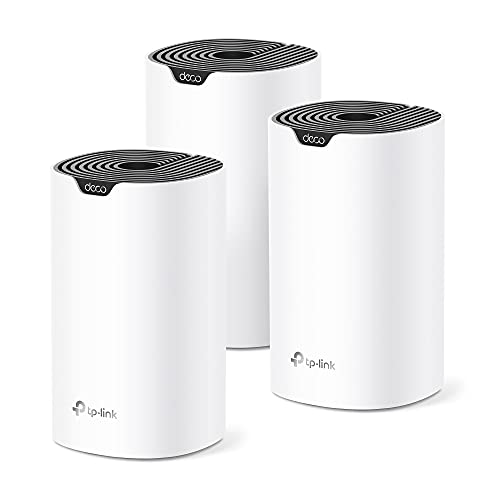 TP-Link Deco S4 Mesh Wi-Fi System, 3-Pack | Check price on Amazon | |
 TP-Link Deco M5 Mesh Wi-Fi System, 3-Pack | Check price on Amazon | |
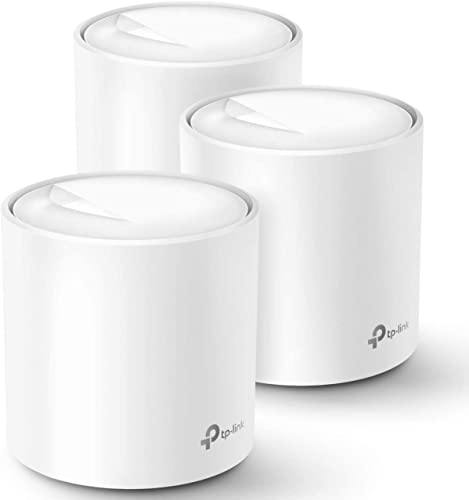 TP-Link Deco X20 Mesh Wi-Fi System, 3-Pack | Check price on Amazon | |
 Amazon eero 6 Plus Mesh Wi-Fi System, 3-Pack | Check price on Amazon |
Key takeaways
- Compare five inexpensive mesh router systems for whole-home coverage, easy setup, and reliable Wi-Fi 6 and Wi-Fi 5 performance without overspending.
A single router in a corner of the house rarely reaches every room with a strong, steady signal. Thick walls, long hallways, upstairs bedrooms, and a home office at the far end of the floor plan all weaken the connection, so video calls freeze in one room while streaming works fine in another. A mesh system solves that problem in a different way. Instead of one box trying to cover everything, several small units work together as one network, passing the signal from node to node so coverage spreads evenly through the home. Inexpensive mesh routers now include Wi-Fi 6 models, app-guided setup, and parental controls. Each system below is a complete three-pack mesh system, not a single router and not a plug-in extender.
As an Amazon Associate, we earn from qualifying purchases.
Quick Answer
For most homes, the TP-Link Deco X20 offers the strongest balance of speed, coverage, and modern Wi-Fi 6 features at a modest cost. Households on a tighter budget should look at the TP-Link Deco S4, while Alexa households that want the simplest setup should consider the Amazon eero 6 or eero 6 Plus.
How to Choose
Begin with the size and shape of the home. A three-pack mesh system suits most houses with two or three bedrooms, a basement, or a second floor. Manufacturers state coverage in square feet, and those figures assume fairly open space, so a home with thick walls, brick, or concrete will get less real-world reach than the headline number suggests. When the layout is long or L-shaped, placing nodes in a chain down the hallway matters more than buying the system with the largest coverage claim.
Next, match the Wi-Fi standard to the internet plan. Wi-Fi 6 systems handle many connected devices more efficiently than older Wi-Fi 5 systems, and they are the better choice when the household has a fast internet plan and many phones, laptops, televisions, and smart home gadgets online at once. Wi-Fi 5 systems still work well for browsing, streaming, and video calls on slower plans, and they often cost less, so they make sense when the plan itself is the limiting factor rather than the router.
Count the devices, not just the people. A family of four can easily have thirty or more connected devices once phones, tablets, laptops, televisions, game consoles, smart speakers, cameras, and thermostats are added together. Every system in this guide supports dozens of devices, but the higher-capacity models leave more headroom for guests and future gadgets. Ethernet ports deserve attention too. Some nodes have two gigabit ports, which allow a television or console to connect by cable for a steadier link. Other extender-style nodes have no Ethernet port at all. Finally, check the app: the better apps walk through placement and passwords in a few clear steps, and they include parental controls and a guest network.
TP-Link Deco S4 Mesh Wi-Fi System, 3-Pack
The TP-Link Deco S4 is the most affordable entry point in this guide, and it suits households that want whole-home coverage without paying for the newest wireless standard. This is a Wi-Fi 5 system, so it does not offer the efficiency gains of Wi-Fi 6, but for browsing, streaming, video calls, and everyday smart home use on a standard internet plan, it covers the essentials well. Its three cylindrical units are compact and unobtrusive.
Coverage is the main strength here. The three-pack is designed to cover a large home, and in a typical two-story house the nodes can be spread across the ground floor, the upstairs landing, and a far bedroom to remove the dead zones a single router leaves behind. Each unit carries two gigabit Ethernet ports, so a smart television or game console near a node can connect by cable and no longer compete for wireless airtime. The system supports a large number of connected devices, so a household with phones, tablets, laptops, and smart gadgets will not run into a device ceiling quickly.
Setup runs through the Deco app, which guides placement and network naming. The app also provides parental controls, a guest network, and quality-of-service settings that let the household prioritize streaming or video calls when the network is busy. Voice control through Alexa adds convenience, and the Deco S4 works as a router replacement, connecting directly to the modem. Wi-Fi 5 means it is not the best match for a very fast internet plan or a home where many people stream high-definition video at the same time.
TP-Link Deco M5 Mesh Wi-Fi System, 3-Pack
The TP-Link Deco M5 has been a popular whole-home mesh system for several years, and it remains a strong inexpensive choice for households that value security features and simple management as much as raw speed. Like the Deco S4, it is a Wi-Fi 5 system, so it sits in the same performance class, but it adds a more complete set of built-in security and control tools. That makes it a good fit for families who want antivirus protection, parental controls, and device management included rather than added through a separate service.
Coverage matches the Deco S4, with the three-pack designed for a large home and a long list of supported devices. The three disc-shaped units are small and light. Placement follows the same logic as any mesh system: one unit near the modem, one in the middle of the home, and one near the farthest rooms where the signal currently fades. The Deco app shows the connection quality between units.
The standout feature is HomeCare, the built-in suite that covers antivirus protection for connected devices, parental controls, and quality-of-service prioritization. Parental controls can set time limits and filter content by category for each device, which is useful when children have tablets or game consoles. The system also works with Alexa and IFTTT. Performance is steady rather than spectacular. Browsing, streaming, and video calls run smoothly on a standard plan, and the mesh handoff between nodes is seamless enough that a phone moving from room to room stays connected without dropping a call.
TP-Link Deco X20 Mesh Wi-Fi System, 3-Pack
The TP-Link Deco X20 is the pick for most households in this guide because it brings Wi-Fi 6 into the inexpensive range without giving up coverage or device capacity. Wi-Fi 6 handles many connected devices more efficiently than Wi-Fi 5, so a home with phones, laptops, televisions, cameras, and smart speakers all online at once will notice steadier performance during busy evenings. It also supports faster internet plans, which makes it the safest choice for households that plan to upgrade their connection.
Coverage is slightly larger than the Wi-Fi 5 models above, and the device limit is higher, which gives the system more headroom as the household adds gadgets. Each unit has two gigabit Ethernet ports, for a total of six across the three-pack, and the system supports wired Ethernet backhaul. That means homes with Ethernet cabling can link the nodes by cable and keep the full wireless capacity for devices.
Security is handled by HomeShield, which provides network protection, parental controls, and device reports through the app. Parents can set profiles for each child and pause the internet for specific devices, and the system supports the WPA3 security standard. The Deco X20 is a dual-band system, so the link between nodes shares the same bands as connected devices, and speeds at the farthest node will be lower than speeds beside the main unit. It does not have multi-gigabit Ethernet ports. For a typical family home with a fast plan, many devices, and dead zones to remove, the Deco X20 offers the best balance in this guide.
Amazon eero 6 Mesh Wi-Fi System, 3-Pack
The Amazon eero 6 is the simplest system in this guide to set up and to live with, and it is the natural choice for households that already use Alexa. This is a Wi-Fi 6 mesh system, so it brings the same efficiency benefits as the Deco X20, but the design philosophy is different: fewer settings to manage, a guided app that does most of the work, and tight integration with the Alexa ecosystem. For buyers who want strong Wi-Fi without learning networking terms, that simplicity is a genuine advantage.
The three-pack in this guide contains one router and two extenders, and together they cover a large home. The router connects to the modem and provides Ethernet ports for a wired device, while the extenders plug into wall outlets in other rooms and extend the network wirelessly. Each node also includes a built-in Zigbee smart home hub, which can connect compatible smart lights, locks, and sensors directly, removing the need for a separate hub.
Performance suits a moderate internet plan. The system supports plans up to 500 Mbps, covers a large area, and handles a high number of connected devices at once. Streaming, video calls, and browsing run smoothly across the home. The eero app manages the network, offers a guest network, and provides optional advanced security and parental controls through the eero Plus subscription. The core mesh features work without that subscription. The extenders in this pack have no Ethernet ports, so a television in a far room must connect wirelessly, and households with a gigabit plan will not get the full benefit of their connection from this system.
Specs
| Feature | Detail |
|---|---|
| Wi-Fi standard | Wi-Fi 6, dual-band AX1800 |
| Coverage | Up to 4,500 square feet |
| Devices supported | 75 or more devices |
| Pack contents | 1 router and 2 extenders |
| Internet plan support | Up to 500 Mbps |
| Smart home hub | Built-in Zigbee hub |
| App management | eero app with guest network |
| Warranty | 1 year |
Amazon eero 6 Plus Mesh Wi-Fi System, 3-Pack
The Amazon eero 6 Plus builds on the eero 6 with support for faster internet plans, and it is the eero to choose when the household has a gigabit connection or expects to upgrade to one. The design and the setup experience are the same as the eero 6: three small white units, a guided app, and close integration with Alexa. The difference is in capacity. Where the eero 6 is built for moderate plans, the eero 6 Plus supports plans up to a gigabit, so it will not become the bottleneck when the incoming connection is fast.
Coverage matches the eero 6, with the three-pack designed for a large home and a high device count. The nodes handle dozens of connected devices at once, and the Wi-Fi 6 radio manages simultaneous streaming, video calls, and smart home traffic with less congestion than an older Wi-Fi 5 system. Each node includes a built-in smart home hub, which supports Zigbee devices and adds Thread support for newer smart home gadgets.
The eero 6 Plus also benefits from gigabit Ethernet on its nodes, which gives wired devices a faster and steadier link than the eero 6 extender layout allows. A computer, console, or streaming box near a node can connect by cable and leave the wireless capacity free for phones and tablets. The eero app offers a guest network and optional advanced security and parental controls through the eero Plus subscription. This is still a dual-band system, so speeds at the farthest node will be lower than speeds near the main router. This system is best for Alexa households with a fast internet plan and for anyone building a smart home around a built-in hub.
Who Should Skip It
Inexpensive mesh routers are not the right choice for every home. Households with a very fast multi-gigabit internet plan should look beyond this guide, because none of these systems has multi-gigabit Ethernet ports, and a faster plan deserves hardware that can use it. The same applies to homes where several people play competitive online games and stream high-definition video at the same time on wired connections.
Very large homes also need a different approach. A three-pack covers a large house, but a home with four or more floors, a detached guest house, or a long outdoor area will need extra nodes or a system designed for a larger footprint. Renters in a small apartment should skip a three-pack altogether. A single good router, or a two-pack at most, will cover a small flat, and a third node placed too close to the others can cause interference rather than improvement. The same logic applies to a studio where the current router already reaches every room. Households that need advanced networking features should also look elsewhere, because these systems keep advanced settings deliberately simple.
FAQ
Do I need a three-pack mesh system, or will a single router work?
A three-pack suits homes with two or more floors, long layouts, or rooms where the signal currently drops. A single router works well in a small apartment or a compact home where every room is close to the router. When two or more rooms have weak signal, a mesh system is usually the better fix.
Is Wi-Fi 6 worth it in an inexpensive mesh router?
Wi-Fi 6 is worth it when the household has many connected devices or a fast internet plan, because it manages simultaneous connections more efficiently than Wi-Fi 5. On a slower plan with only a few devices, a Wi-Fi 5 system performs well and costs less. Choose Wi-Fi 6 when the device count is high.
Can I use a mesh system with my current modem?
Yes, in most cases. A mesh system connects to the modem with an Ethernet cable and replaces the old router. When the modem and router are combined in one box, set that box to bridge mode or turn off its Wi-Fi so the mesh system handles the network.
Where should I place the mesh nodes?
Place the main unit near the modem, then place the other nodes halfway between the main unit and the rooms with weak signal, in open spots rather than inside cabinets or behind large furniture. Nodes work best when they are no more than two rooms apart.
Final Verdict
The best inexpensive mesh router depends on the home, but the TP-Link Deco X20 is the strongest all-round choice in this guide. It offers Wi-Fi 6, broad coverage, a high device limit, wired backhaul, and modern security at a modest cost, and it suits the widest range of households. Buyers on the tightest budget should choose the TP-Link Deco S4, which covers a large home well on a standard plan. Families who want built-in security and parental controls should look at the TP-Link Deco M5, while Alexa households should choose between the Amazon eero 6 for moderate plans and the Amazon eero 6 Plus for gigabit plans. A mesh system will not fix a slow internet plan, but it will spread the connection the household already pays for into every room.
| Product | ASIN |
|---|---|
| TP-Link Deco S4 Mesh Wi-Fi System, 3-Pack | B084GTH5LL |
| TP-Link Deco M5 Mesh Wi-Fi System, 3-Pack | B06WVCB862 |
| TP-Link Deco X20 Mesh Wi-Fi System, 3-Pack | B085Z35GY6 |
| Amazon eero 6 Mesh Wi-Fi System, 3-Pack | B085WSCTS4 |
| Amazon eero 6 Plus Mesh Wi-Fi System, 3-Pack | B08ZK2BHP2 |